Know the number before month end
Wireless retail is a pace business. Activations, attach rate and accessory revenue move daily, commissions depend on them, and slow inventory turns into dead capital quietly. We run the back office and the reporting so a shortfall shows up while there are still days left to close it — not in a month-end report.
What makes phone stores & wireless retail books different
These are the places we see go wrong most often — and the first things we fix.
Numbers arrive too late to act on
By the time month-to-date sales have been compiled from exports and circulated, the month is largely gone and the window to influence it has closed.
Nothing reconciles across systems
Sales sits in one export, inventory in another, labour in a third. Nothing shares a key, so joining them is a manual job somebody rebuilds every week.
Commissions are contested every cycle
When rep and manager bonus depends on numbers nobody fully trusts, every payout turns into a dispute instead of a conversation about performance.
Built for how you actually operate
- Activations, attach rate & accessory revenue by store and rep
- Pace to goal — projected month-end against target
- Intraday sales tracking with zero-selling stores flagged
- FIFO inventory ageing bands and capital-at-risk reporting
- Purchase orders tracked ordered vs received
- Loss prevention and lost-device ledger reconciliation
- Rep and manager commission calculation & reconciliation
- Daily cash position, deposits and payment runs
- Per-store P&L and multi-store consolidation
Software we work in
- QuickBooks
- Xero
- POS & activation systems
- Bill.com
- Gusto
- Excel / Google Sheets
Using something else? We adapt to your stack — just ask.
Flexible pricing
from $10/hour
- Hourly, dedicated, or fixed monthly
- Free first-month trial
- Onboarding in 24 hours
The reporting cycle behind every door
Store data should never be keyed by hand. It arrives on a schedule, gets checked before it is trusted, and only then reaches a number anyone acts on — so a store manager and an owner are arguing about the decision, never about the figure.
Collect
Back officeSales, inventory, roster and cash data pulled from your POS and systems on a set schedule.
Validate
Back officeRequired columns, row shape and key values checked first — failed rows are reported, never silently loaded.
Reconcile
Back officeRecords normalised and joined on store, employee and period, then reconciled to the ledger.
Compute
Back officeBusiness rules turn records into pace to goal, ageing bands, attach rate and exception flags.
Exceptions to an owner
ClientZero-selling doors, stores behind pace, ageing stock and missing closures routed to the person who can fix them.
Commission & payout
Back officeRep and manager incentives calculated against reconciled numbers and published as per-person statements.
Period close
Back officePer-store P&L, cash position and consolidated reporting delivered for the period.
Data controls
- Independent review before any commission statement is published
- Failed or malformed data rows rejected and reported, never loaded
- Re-delivered files can't create duplicate records
- Ageing inventory banded so slow stock is visible long before it is dead
- Role-based access — a manager sees their stores, ownership sees the network
- Full audit trail on every import, approval and adjustment
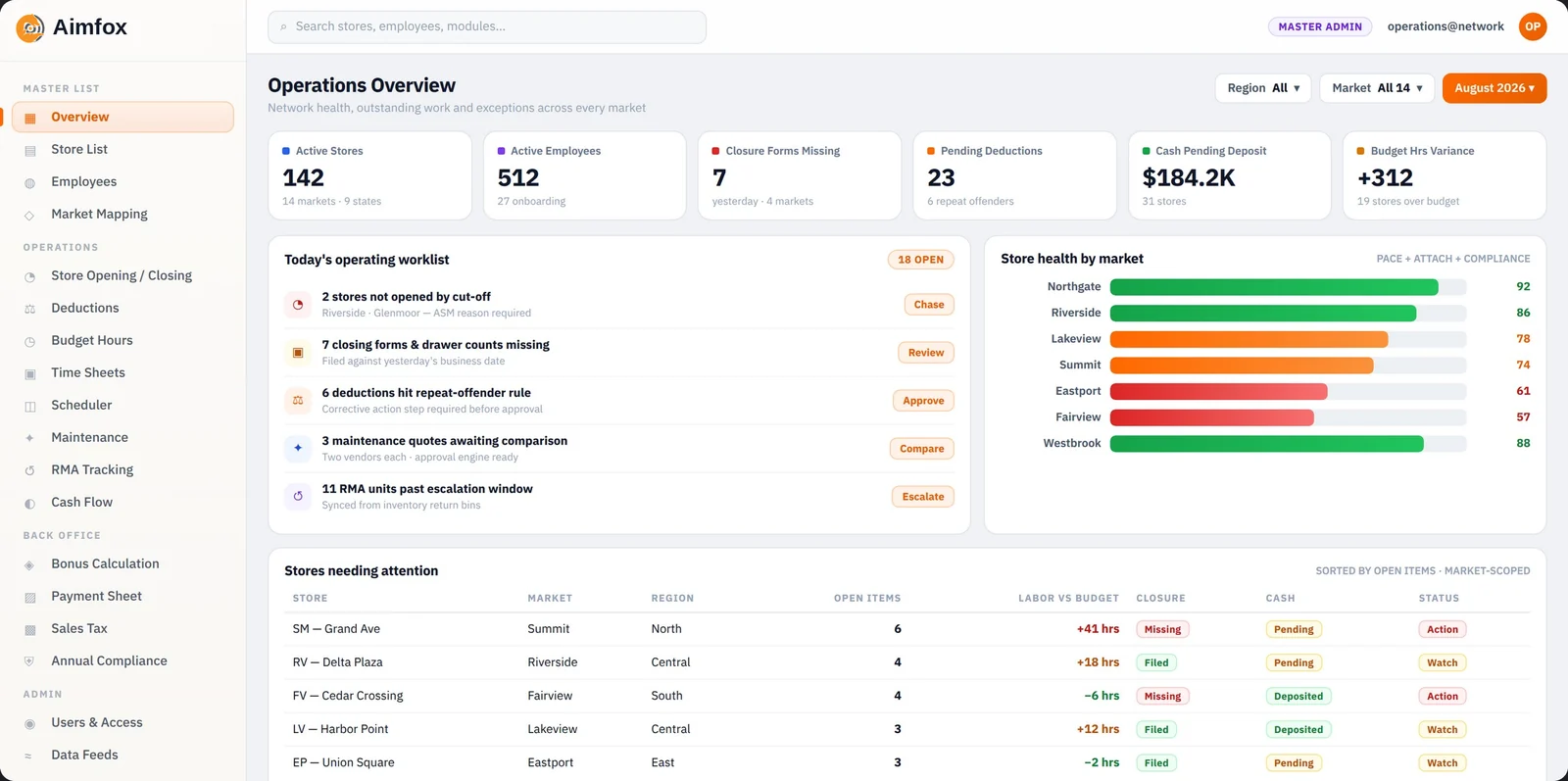
The dashboard behind it
This workflow doesn't run on email and spreadsheets
Every stage above is a state in a system we built and operate — data pulled and validated on a schedule, exceptions routed to a named owner, and access scoped so each person sees only their own portfolio. Nothing reaches a statement or a payment without a human sign-off.
- Automated, validated feedsLoaders re-run safely; a failed feed shows as a red row, not silence.
- Exceptions have an ownerAnything that breaks a rule lands on a named person's queue with a due date.
- Access scoped in the data layerPermissions are enforced where the query runs, not just hidden in the UI.
Where we usually start
Phone Stores & Wireless Retail, answered
Yes — month-to-date and intraday activations, accessory revenue, and attach rate broken down by market, store, and salesperson, all measured against the goal you set. Leaderboards come from the same reconciled numbers.
We calculate incentives against reconciled sales data using your eligibility rules and components, then publish per-person statements. Every calculation is independently reviewed before it goes out, which is what stops payout disputes.
Yes. Every SKU line is banded by days on hand — typically under 60, 60–120, and over 120 days — with capital at risk quantified, so slow stock gets transferred, promoted or returned while it still has value.
Yes. You get per-store and per-market reporting plus a consolidated network view, on the same definitions — so stores can be compared fairly and an underperforming door is obvious early.
We work from the sales, activation, and commission data your systems and carrier portals produce, and reconcile it to your books. Tell us which systems you run and we'll confirm the reporting we need.
Other industries we know well
Leave the accounting to us
Your first month is free, onboarding takes as little as 24 hours, and rates start at $10/hour. No lock-in.